


Phoner: Second Phone Number
4.15.54K Reviews
App Specs
- Version
- 8.70.1
- Updated On
- License
- Free
- Downloads
- 1,000,000+
- Developer
- Phoner Holdings LLC
- Categories
- Communication
- Platform
- Android, iOS
Screenshots
 Analysis by AppCompare
If you’ve ever found yourself wishing for a second phone number without the hassle of getting a new device or SIM card, then Phoner: Second Phone Number might just be your new best friend. This app is like having a secret identity in your pocket, perfect for those times when you want to separate work from personal life, or just keep your primary number private. Let me walk you through my experience with the app, and why I think it could be a game-changer for you.
Start with a clear reason for a second line
I find a second number most useful when I can name the job it needs to do. Maybe I’m arranging a sale with someone I don’t know, taking inquiries for a small side business, or sharing contact details for a temporary project. In those cases, a separate line gives me a practical boundary: I can use it for that conversation rather than handing out the number tied to family, friends, and everyday accounts.
That boundary works best when I decide in advance what belongs on the second line. For example, I might use it only for customer calls and messages, then keep personal conversations on my usual number. Without that simple rule, two lines can become two inboxes to check, not a cleaner way to communicate. Phoner is strongest when it solves a specific privacy or organization problem rather than becoming another number I share everywhere.
It is also worth thinking about how long you need the line. A short-lived listing or a burst of freelance work is different from a number you expect clients to use for years. Before relying on any second-line service as a permanent business identity, I’d consider how important continuity is and whether I’m prepared to keep managing the service over time. For a low-stakes contact channel, flexibility matters more than building your whole operation around it.
A practical flow from setup to reply
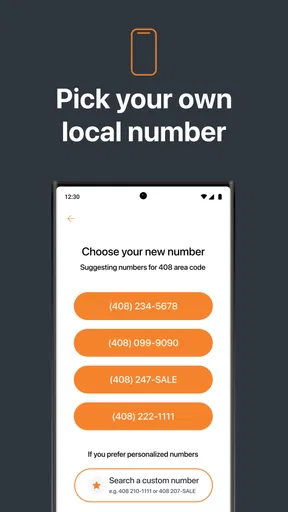
Getting started is presented as a short process: install the app, choose a number, and begin using it for calls and texts. The area-code choice can be useful when the people you expect to contact are concentrated in a particular place. I’d choose based on the people I’m actually reaching, not just on which code looks familiar; a local-looking number is a convenience, not a substitute for being clear about who I am.
After choosing the number, the useful next step is to make the first interaction simple. If I’m responding to a marketplace inquiry, I can give the second number to the interested person and keep the conversation there. If the exchange turns into a call, the app is intended to handle that communication too. The important handoff is between the app and the person on the other end: they need to know which number to call or text, and I need to recognize that a reply to that number belongs to the specific activity.
For a small business, I’d keep the number consistent across the places where customers are likely to see it, rather than switching between the second line and my personal one. I’d also tell a trusted collaborator which number is being used if they may need to follow up. These habits are not special app functions; they are what make a separate number genuinely useful instead of confusing.
Worth Reading Before You Choose

EA SPORTS FC Mobile 26 Is a Bigger Football Game, but It Takes Time

Flipboard Shows What News Apps Must Do Beyond the Feed

Switching to Android Auto Means Rethinking Your Driving Routine

Google Calendar Makes a Crowded Week Easier to Manage

Ludo King Makes the Most of the Minutes Between Plans

Baby Panda World Brings Quick Play to Modern Phones, but Its Game Library Feels Busy
If your workday is busy, set a routine for checking the second line. A quick review before or after your main tasks can prevent a customer message from being overlooked, while avoiding the feeling that every contact channel needs constant attention. A separate number gives you a boundary, but it does not automatically create one: the benefit comes from deciding when to respond and sticking to it.
Setting Up and Getting Started
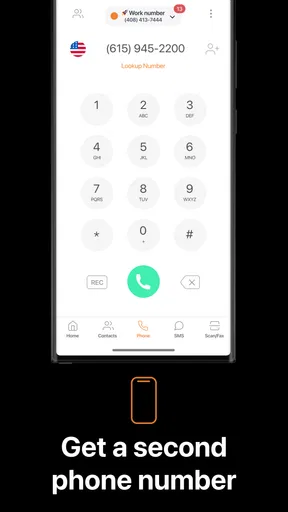
Let’s face it, no one wants to jump through hoops just to set up an app. Luckily, Phoner: Second Phone Number makes it super easy. Once you download it, you’re guided through a quick setup process. You can choose your new number based on your preferred area code, which is a neat feature if you want to appear local in a different city.
The user interface is clean and straightforward. You know that feeling when you open an app and it’s like stepping into a maze? Not here. Everything is laid out intuitively, so you’re not left scratching your head, wondering which button to press.
Features That Stand Out
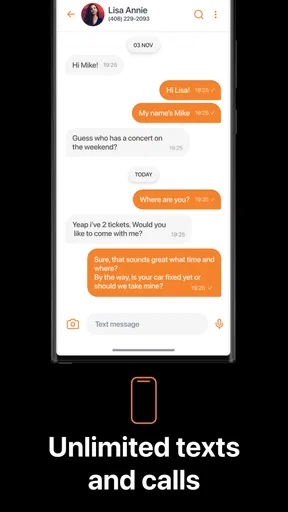
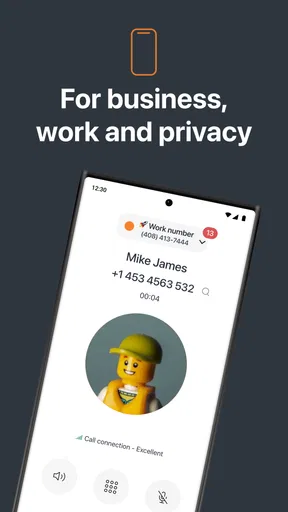
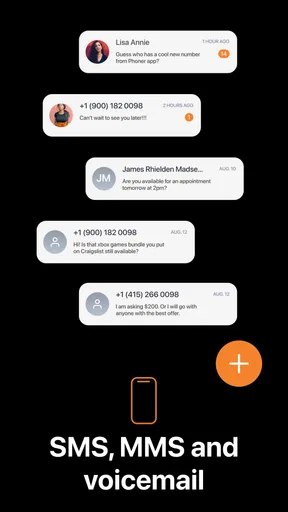
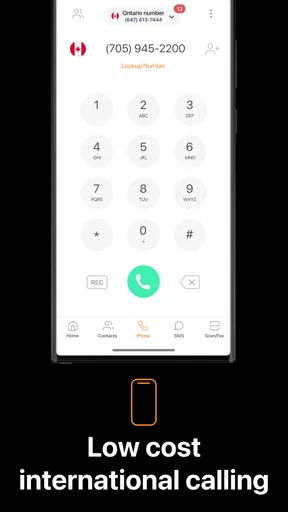
So, let’s talk features. One of the standout features is the ability to make and receive calls and texts using your new number. It’s seamless, and the quality is just as good as my regular line. Plus, it supports international calls, which is perfect for those of us who have friends or business contacts overseas.
Another cool feature is the option to buy credits. Rather than being tied to a monthly fee, you can top up as needed. This pay-as-you-go model is perfect for sporadic use. I also appreciated the privacy options. You can easily block unwanted calls or texts, which is a lifesaver when dealing with spam.
The credit approach is a meaningful trade-off to consider. It can suit someone who uses the line occasionally and prefers to add funds when needed, but it asks you to keep an eye on usage instead of treating communication as an invisible, unlimited expense. I’d check the in-app purchase choices before making Phoner my main channel for frequent calls, especially if I expect long conversations or steady daily traffic. The listed purchases range from $0.99 to $99.99 per item, so the right fit depends on how often I plan to use the service and what I choose to buy.
That makes the app a different proposition from a regular mobile line bundled with a phone plan. A conventional second SIM or eSIM can be a better fit if I need a number integrated into the phone’s normal calling setup or want to keep the line as part of a carrier account. Phoner instead makes sense when I value an app-based extra number and want to keep the physical phone I already use. It is also more focused than a general messaging app: the point is to have another number for calls and texts, not to move all communication into a new social network.
Privacy and Security
Privacy is a big deal these days, and Phoner doesn’t disappoint. The app doesn’t share your real number, which is great for online dating, selling stuff online, or any scenario where you might be wary of giving out your personal digits.
One thing I found particularly reassuring is that the app doesn’t store your messages or call logs on its servers. It’s all about keeping your information safe and sound. For anyone concerned about data breaches, this is a big plus.
I still treat a second number as a buffer, not a promise of complete anonymity. A person who has the number can contact that line, so I’d share it selectively and avoid sending details I would not want attached to a conversation. Blocking unwanted contacts can help once an interaction goes sour, but the better first step is to avoid posting a number more widely than necessary. For a public-facing business or a sensitive situation, I’d think carefully about what information I share and whether an app-based line is the right channel.
There is another small but important workflow point: tell people which line you are using when a conversation moves from text to a call. If someone saves the number under your personal contact by mistake, later replies can become hard to place. I’d label the contact or keep a brief note about where I shared the number. That little bit of housekeeping makes the privacy boundary easier to maintain when several conversations are active.
When and Why You Might Need It
Let’s be real – there are countless scenarios where a second phone number comes in handy. For entrepreneurs or freelancers, it’s a must-have for distinguishing between work and personal calls. If you’re managing a side hustle, this app can help streamline your communication lines without mixing them up.
Even for personal use, it’s invaluable. Think about those times you’ve hesitated to post your number on a classified ad or a dating site. With Phoner, you can interact without the worry of unwanted follow-ups after the fact.
A realistic example is selling a used desk while juggling a normal workday. I can put the second number in the listing, answer a buyer’s question when I have a moment, and arrange a call or pickup without exposing the number my friends and family use. If the sale is complete and the contact keeps messaging, I can block the unwanted communication. The outcome is not that every risk disappears; it is that the sale has a more contained route to my attention.
For freelancers, I’d use the same logic but with a longer horizon. A separate number can give new clients a straightforward way to reach me without requiring a second handset. However, if a client’s work depends on guaranteed access, shared team coverage, business records, or a formal phone system, I would compare dedicated business services before settling on an app. Phoner is aimed at an extra line, not a complete customer-support operation.
It is less suitable for someone who wants one phone number that works identically across every device and service, or who does not want to monitor an additional app. It may also be the wrong choice if the main need is a carrier-backed line for dependable long-term identity, rather than a convenient way to separate selected calls and texts. In those cases, a second SIM, an eSIM plan, or a business phone service may fit better, depending on the need.
Ending Thoughts
In conclusion, Phoner: Second Phone Number is a versatile tool that fits seamlessly into both professional and personal scenarios. Its easy setup and intuitive interface make it accessible for everyone, from the tech-savvy to the technophobes.
I’ve found it to be a reliable solution for maintaining privacy and organization in my communications. Whether you’re looking to add a layer of privacy to your personal life or streamline your work-life balance, this app is definitely worth a shot. So, why not give it a try and see how it fits into your routine?
Appsverse, Inc. makes Phoner as a free communication app, though using it can involve optional in-app purchases. It is rated for Everyone, and the current version is 8.48; the stated minimum operating-system requirement is version 6.0. The app has an average rating of 4.2 from around 22,000 ratings, with about 5,500 written reviews and over one million installs. Those figures suggest it has reached a sizeable audience, but I’d still judge it by whether its separate-number workflow matches my own habits.
My recommendation is fairly specific: try it if you want an extra number for a defined purpose, are comfortable handling calls and texts in an app, and can keep track of any credit spending. Skip it if you need a fully integrated carrier line, a shared business phone desk, or a communication channel you never have to check separately. For occasional selling, dating, freelance inquiries, or a modest side project, that balance can be worthwhile. Used with a clear boundary, it gives me a practical way to make a number public without making my everyday line public too.
Pros
- Easy to set up and use interface.
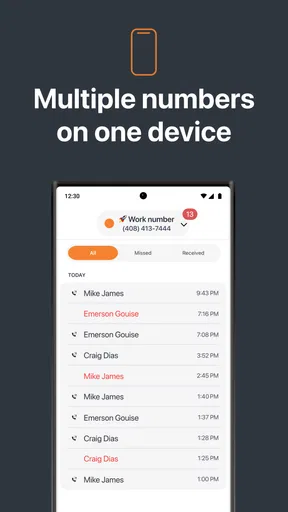
- Offers multiple phone numbers.
- Affordable pricing options available.
- Great for privacy protection.
- Works on both Android and iOS.
Cons
- Limited free features available.
- May experience occasional call drops.
- Ads can be intrusive at times.
- Requires internet for some features.
- Not ideal for primary phone use.
FAQs for Phoner: Second Phone Number
What is Phoner: Second Phone Number used for?
Phoner: Second Phone Number is an app designed to provide users with an additional phone number on their existing devices. This can be incredibly useful for separating personal and business calls, managing online privacy, or even dating. The app allows users to make and receive calls and texts without revealing their primary phone number.
How secure is Phoner: Second Phone Number?
Phoner prioritizes user privacy by keeping your personal number hidden. It uses secure encryption protocols to ensure that calls and messages are protected. Additionally, the app allows you to block unwanted numbers and manage privacy settings to further enhance security, making it a reliable choice for safeguarding your identity.
Can I choose my second phone number with Phoner?
Yes, Phoner allows users to select from a range of available numbers. You can choose a local area code or even an international number depending on your needs. This flexibility makes it suitable for users who need to appear local in different regions or countries, which is a major advantage for business or travel.
Is there a cost associated with using Phoner: Second Phone Number?
Phoner offers both free and paid plans. While you can access basic features at no cost, premium features such as additional numbers, international calls, and ad-free experience require a subscription. Users can choose plans based on their needs, ensuring affordability and access to desired features.
Does Phoner work internationally?
Yes, Phoner supports international usage, allowing users to make and receive calls and texts globally. This feature is particularly beneficial for frequent travelers or those conducting international business. However, international calls might incur additional charges, so it’s advisable to check the rates within the app before making calls.


